playbookS

SDR attribution that actually works

Your SDRs are booking meetings. Your AEs are closing deals. But when the board asks "how many meetings did SDRs source this quarter?" you're pulling data from three systems and hoping the numbers add up. That gap between effort and credit is costing you pipeline visibility and SDR morale.

author
Charanyan
March 4, 2026
Table of Contents
Increase your pipeline conversions
Let's Talk
The Plays

Three ways to hand off with full attribution

You've configured the Relay, matching rules, and distribution. Now your SDRs need to actually use it. Each play covers a different handoff scenario. All three produce the same clean attribution data in your CRM.

Play 1
The CRM Relay

Best for: SDRs working accounts from Salesforce or HubSpot

The most common handoff. Your SDR is working a lead in the CRM, qualifies them, and needs to book a meeting on the right AE's calendar. Here's the flow:

  1. SDR opens their Relay link from inside the CRM (bookmarked or embedded as a custom button)
  2. SDR enters the prospect's email address into the Relay form
  3. RevenueHero checks the CRM for an existing account match and enriches the prospect's data
  4. The right AE's calendar appears based on account ownership or distribution rules
  5. SDR walks the prospect through booking (on a live call) or sends the booking link
  6. Meeting is created with full attribution: SDR as booker, AE as assignee, relay name as source
    ‍
The Relay booking page from the SDR's perspective. The prospect's email triggers CRM lookup and enrichment. The correct AE's calendar loads automatically.

‍

The CRM Relay is the workhorse. It handles the majority of SDR-to-AE handoffs: cold outbound sequences, inbound follow-ups, and event lead qualification. Every meeting booked through this relay writes attribution data to the CRM automatically.
‍

Add the Relay link as a custom button on the Salesforce Lead layout. One click from the lead record opens the relay pre-filled with the prospect's email. Your SDRs never have to copy-paste.

‍

Play 2
The Inbox Relay (Chrome Extension)

Best for: SDRs doing outbound sequences via email

Your SDR is in Gmail or Outlook, exchanging emails with a prospect who's ready to meet. Instead of switching to the CRM, the SDR uses the RevenueHero Chrome Extension to hand off right from their inbox.

  1. SDR opens the Chrome Extension while viewing the prospect's email
  2. The extension pre-fills the prospect's email from the current conversation
  3. SDR selects the appropriate Relay (e.g., "SDR Relay - Outbound")
  4. RevenueHero generates a booking link pre-routed to the right AE
  5. SDR drops the link into the email reply with one click
  6. Prospect books directly on the AE's calendar. SDR gets full attribution credit.
The Chrome Extension generates a pre-routed booking link without leaving the inbox. The SDR pastes it directly into their email reply.

The Inbox Relay is designed for velocity. SDRs doing 50+ outbound emails per day can't afford to context-switch to the CRM for every handoff. The Chrome Extension keeps them in Gmail while maintaining full attribution integrity.
‍

The Chrome Extension works with email sequence tools too. When a prospect replies to a Salesloft or Outreach sequence, the SDR can generate a relay link directly from the reply thread. The attribution chain is preserved: outbound sequence triggered the reply, SDR initiated the relay, AE received the meeting.

‍

Play 3
The Hot Handoff (Live Call)

Best for: SDRs who qualify on a discovery call and hand off immediately

Your SDR is on a live call with a prospect. The qualification is done. The prospect is ready to talk to an AE. Instead of "I'll send you a link after this call," the SDR books the AE meeting while the prospect is still on the line.

  1. SDR qualifies the prospect on a discovery call
  2. SDR opens the Relay link in a new browser tab (or via Chrome Extension)
  3. SDR enters the prospect's email. RevenueHero runs CRM matching in the background.
  4. The right AE's calendar loads. SDR reads available slots to the prospect.
  5. Prospect picks a time. Calendar invite sends to both the prospect and the AE immediately.
  6. CRM is updated: SDR as booker, AE as assignee, meeting status as Upcoming

The hot handoff converts at the highest rate because there's zero delay between qualification and scheduling. The prospect's buying intent is at its peak. They don't cool off overnight waiting for a follow-up email with a booking link.

he SDR can paste the relay link directly on browser and schedule handoff for the prospect mid-call.

‍

Relay routing logs showing the full handoff trail: which SDR booked, which AE was assigned, which relay was used, and the final booking status.
‍

Train your SDRs to open the Relay before they start the qualification portion of the call. By the time qualification is complete, the relay page is loaded and ready. The transition from "you're qualified" to "here are some times that work" should be under 5 seconds.
The Problem

SDR attribution breaks the moment meetings leave their calendar

Most scheduling tools record who the meeting is with. They don't record who sourced it. That distinction is the entire foundation of SDR compensation, pipeline reporting, and capacity planning. Here's where it falls apart:

The ghost booker problem

An SDR books a meeting on behalf of an AE. The calendar invite shows the AE. The CRM shows the AE. The SDR who sourced it? Invisible. One RevOps lead told us "we have people booking meetings through links and we have no idea who sourced it."

The no-show black hole

An SDR books 20 meetings this month. Five no-show. CRM says 20 booked, pipeline says 15. Nobody reconciles the difference. The SDR gets credit for 20, the AE complains about lead quality, and the real number is somewhere in between.

The form shuffle

Prospect fills out a form. Routing sends them to the wrong rep. Rep manually reassigns. By the time the meeting happens, the CRM record shows the new rep as the creator. Original routing intent? Gone. One head of sales ops described it as "basically the honor system for who sourced what."

Ownership tug-of-war

SDR qualifies a lead and hands it to an AE. AE books a follow-up. Was that an SDR-sourced meeting or an AE-sourced meeting? Without a system that tracks the chain of custody, every quarter-end becomes a territory dispute.

Reps forget to block calendar

RevOps spends hours every week cross-referencing Salesforce activities, calendar invites, and Slack messages to figure out who actually sourced each meeting. One ops team we spoke with said "the SDR sets up the meeting but the AE gets credited and the SDR has no record of it." If your attribution system requires manual intervention to be accurate, it's not an attribution system. It's a spreadsheet.

RevenueHero solves this with Relays, automatic CRM field population, and full meeting lifecycle tracking. Every meeting records who booked it, who it's for, and how it got there. Here's how to set it up.

Setup

Build your attribution system in four steps

1. Understand the CRM fields RevenueHero populates

RevenueHero automatically writes attribution data to your CRM on every meeting. These fields exist on the meeting activity record and tell you exactly who sourced each meeting and how.

Salesforce fields:

Field Type What It Tells You
RH_Booked_By__c Lookup (User) The internal user who initiated the booking. For relays, this is the SDR. For self-book, this is the prospect.
RH_Booked_By_Name__c Text Display name of the booker. Useful for reporting without joining to the User table.
RH_Booked_By_Prospect__c Boolean TRUE = prospect self-booked (inbound). FALSE = internal rep booked on their behalf (relay/outbound). This is the single most important field for SDR attribution.
RH_Assignee_Name__c Text The rep the meeting was assigned to (the AE). Separate from who booked it.
RH_Meeting_Status__c Picklist Upcoming, Completed, Cancelled, No-Show, Not Booked. Updated in real-time.
RH_Router_Name__c Text Which router or relay processed this meeting. Lets you filter by channel.

‍


The key insight: the unchecked RH Booked By Prospect checkbox is RH_Booked_By_Prospect__c = FALSE in your CRM. That means an internal rep (your SDR) initiated the booking. When it's checked (TRUE), the prospect booked themselves. No manual tagging. No honor system.
‍

Add these fields to your Salesforce report layouts and HubSpot active lists immediately. Create a saved report filtered to RH_Booked_By_Prospect__c = FALSE and you have an always-current "SDR-sourced meetings" report that updates automatically.

‍

HubSpot fields:

Field What It Tells You
rh_meeting_status Upcoming, Completed, Cancelled, No-Show, Not Booked
rh_router_name Which router or relay processed the meeting
rh_no_show Boolean flag for no-show meetings

‍

The key insight: the unchecked RH Booked By Prospect checkbox is RH_Booked_By_Prospect__c = FALSE in your CRM. That means an internal rep (your SDR) initiated the booking. When it's checked (TRUE), the prospect booked themselves. No manual tagging. No honor system.

‍

HubSpot requires a one-time setup to track the booker. Create a custom contact property on the Contact object with the field type set to "HubSpot user" (e.g., "Booker" or "Setter"), refresh your HubSpot fields in RevenueHero under Integrations, and map it in your Relay's CRM Settings. Once configured, every relay handoff records the SDR who sourced the meeting automatically.

‍

‍

2. Create a Relay for SDR-to-AE handoffs

A Relay is RevenueHero's dedicated SDR-to-AE handoff automation. When an SDR uses a Relay to book a meeting, the system records the SDR as the booker and the AE as the assignee. Attribution is automatic.

Relay creation flow showing setup steps: naming the relay, selecting the booker team (SDRs), receiver team (AEs), CRM matching rules, distribution rules, and booking page configuration

‍

Here's what happens in the Relay setup:

  • Booker team β€” Select your SDR team. These are the people who will initiate handoffs. Their identity is recorded as the meeting source.
  • Receiver team β€” Select your AE team. These are the calendars that will appear for booking. The meeting lands on their schedule.
  • CRM matching β€” When the SDR enters a prospect's email, RevenueHero checks your CRM. If the account has an existing owner on the receiver team, that AE's calendar appears automatically.
  • Fallback distribution β€” For accounts without a CRM owner, configure round robin or territory-based routing across the AE team.

The critical detail: the Relay records both the booker (SDR) and the receiver (AE) as separate fields in the CRM. This is what makes attribution work. The SDR's name goes into RH_Booked_By__c. The AE's name goes into RH_Assignee_Name__c. One meeting, two people, clean attribution.

Name your relays by channel: "SDR Relay - CRM," "SDR Relay - Inbox," "SDR Relay - Event Booth." The relay name flows into RH_Router_Name__c in your CRM, so descriptive names let you report on which handoff channel is most effective.

‍

3. Configure CRM matching rules

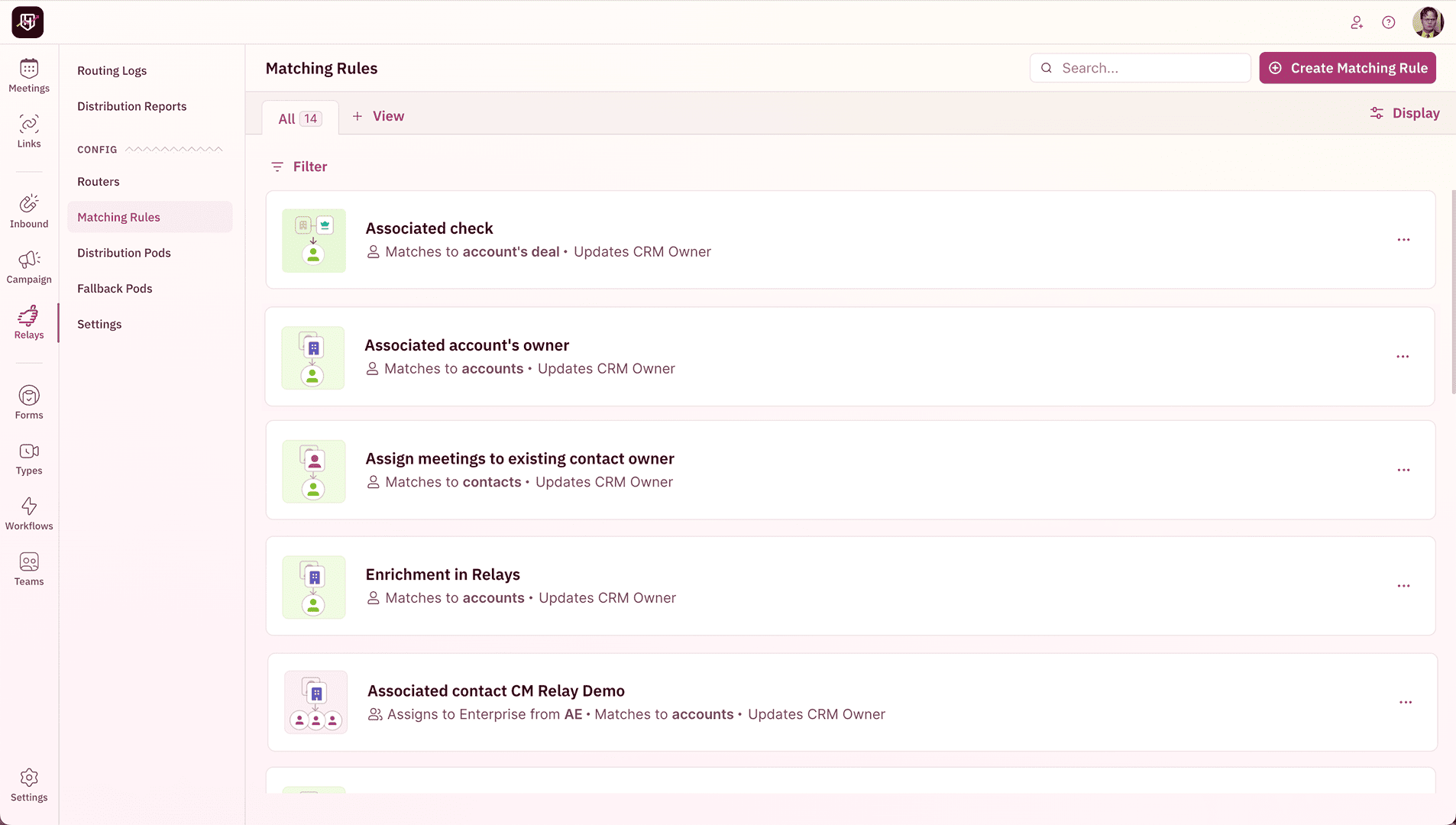
Matching rules determine what happens when the SDR enters a prospect's information into the Relay. This is where you decide whether the meeting goes to an existing account owner or round robin.

‍

The matching flow:

  1. SDR enters the prospect's email into the Relay
  2. RevenueHero checks your CRM for an account matching the prospect's email domain
  3. If a match is found, the account owner's calendar is displayed (assuming they're on the receiver team)
  4. If no match is found, the configured fallback fires: round robin, territory rules, or a specific default AE
  5. Either way, the SDR gets recorded as the booker in CRM fields

This matters for attribution because it preserves the chain: SDR sourced the lead, CRM determined the right AE, prospect picked the time. All three steps are logged.

Enable native enrichment on your Relay. When the SDR enters just a prospect's work email, RevenueHero enriches the record with company name, size, industry, and geography before running matching rules. Your SDRs type one email address. The system does the rest.

‍

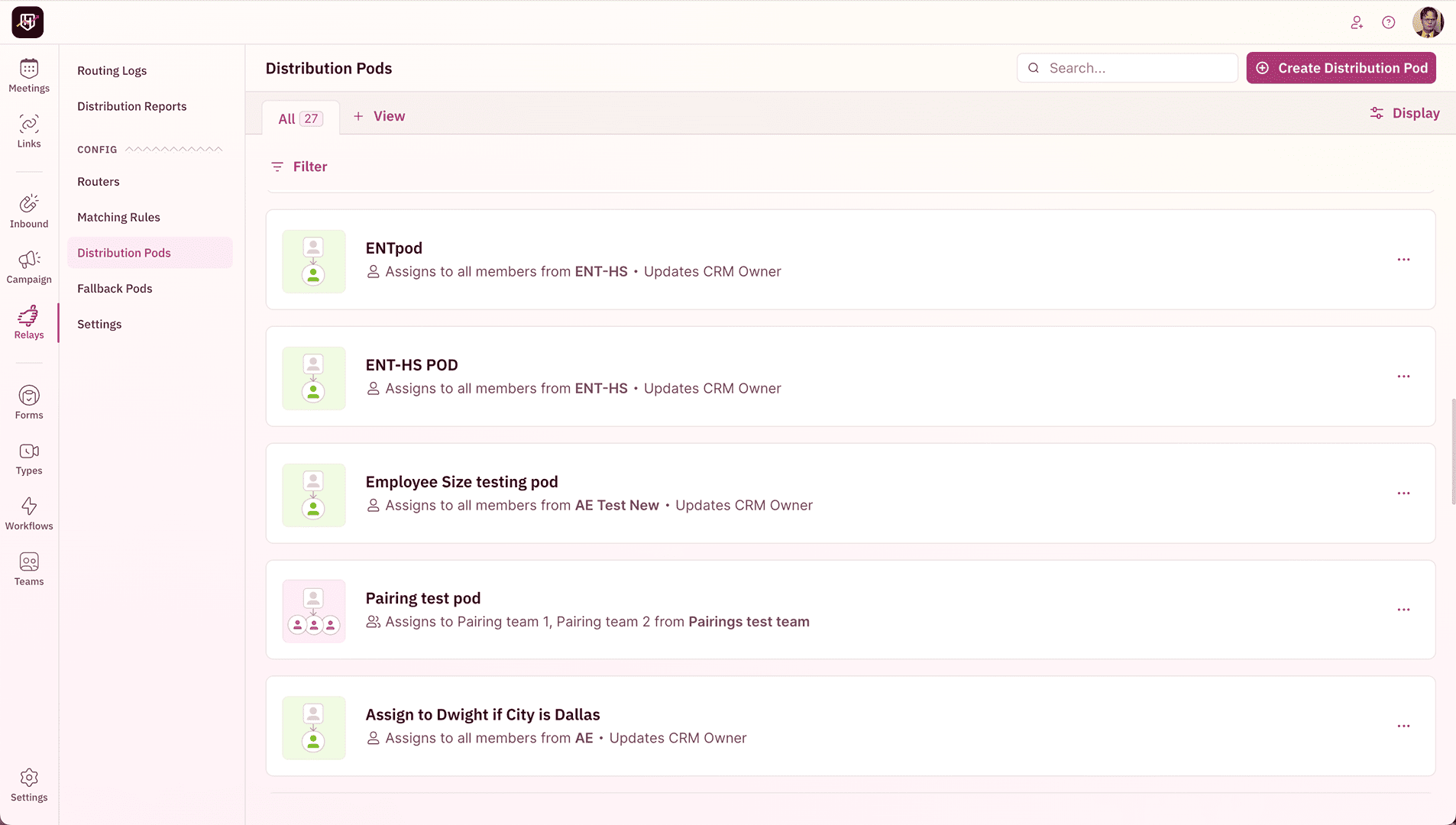
4. Set up distribution pods

Distribution rules control how meetings are assigned when CRM matching doesn't find an account owner. For SDR attribution, the distribution method matters because it determines which AE receives the meeting, but attribution always traces back to the SDR.


Three distribution methods work well for SDR attribution:

  • Balanced Round Robin β€” RevenueHero's unique load-aware distribution. If one AE has 8 meetings this week and another has 3, the system temporarily prioritizes the AE with fewer meetings. Pipeline stays balanced across the team, and SDRs can hand off to any AE knowing the system will pick the right one.
  • Strict Round Robin β€” Pure sequential rotation. AE 1, then AE 2, then AE 3. Predictable and transparent. Good for small teams where everyone should get equal volume.
  • Territory-based β€” Route by geography, company size, or industry. A relay handoff from a prospect at a 500-person company goes to mid-market AEs. A 5,000-person company goes to enterprise AEs. The SDR doesn't need to know which pod is correct. The system routes automatically.
    ‍
Use Balanced Round Robin for relay distribution. When AEs go on vacation, RevenueHero automatically recalibrates the queue. The returning AE isn't penalized with a backlog, and the team that covered doesn't suddenly stop receiving meetings. Credits are adjusted automatically.
The Plays

Three ways to hand off with full attribution

You've configured the Relay, matching rules, and distribution. Now your SDRs need to actually use it. Each play covers a different handoff scenario. All three produce the same clean attribution data in your CRM.

Play 1
The CRM Relay

Best for: SDRs working accounts from Salesforce or HubSpot

The most common handoff. Your SDR is working a lead in the CRM, qualifies them, and needs to book a meeting on the right AE's calendar. Here's the flow:

  1. SDR opens their Relay link from inside the CRM (bookmarked or embedded as a custom button)
  2. SDR enters the prospect's email address into the Relay form
  3. RevenueHero checks the CRM for an existing account match and enriches the prospect's data
  4. The right AE's calendar appears based on account ownership or distribution rules
  5. SDR walks the prospect through booking (on a live call) or sends the booking link
  6. Meeting is created with full attribution: SDR as booker, AE as assignee, relay name as source
    ‍
The Relay booking page from the SDR's perspective. The prospect's email triggers CRM lookup and enrichment. The correct AE's calendar loads automatically.

‍

The CRM Relay is the workhorse. It handles the majority of SDR-to-AE handoffs: cold outbound sequences, inbound follow-ups, and event lead qualification. Every meeting booked through this relay writes attribution data to the CRM automatically.
‍

Add the Relay link as a custom button on the Salesforce Lead layout. One click from the lead record opens the relay pre-filled with the prospect's email. Your SDRs never have to copy-paste.

‍

Play 2
The Inbox Relay (Chrome Extension)

Best for: SDRs doing outbound sequences via email

Your SDR is in Gmail or Outlook, exchanging emails with a prospect who's ready to meet. Instead of switching to the CRM, the SDR uses the RevenueHero Chrome Extension to hand off right from their inbox.

  1. SDR opens the Chrome Extension while viewing the prospect's email
  2. The extension pre-fills the prospect's email from the current conversation
  3. SDR selects the appropriate Relay (e.g., "SDR Relay - Outbound")
  4. RevenueHero generates a booking link pre-routed to the right AE
  5. SDR drops the link into the email reply with one click
  6. Prospect books directly on the AE's calendar. SDR gets full attribution credit.
The Chrome Extension generates a pre-routed booking link without leaving the inbox. The SDR pastes it directly into their email reply.

The Inbox Relay is designed for velocity. SDRs doing 50+ outbound emails per day can't afford to context-switch to the CRM for every handoff. The Chrome Extension keeps them in Gmail while maintaining full attribution integrity.
‍

The Chrome Extension works with email sequence tools too. When a prospect replies to a Salesloft or Outreach sequence, the SDR can generate a relay link directly from the reply thread. The attribution chain is preserved: outbound sequence triggered the reply, SDR initiated the relay, AE received the meeting.

‍

Play 3
The Hot Handoff (Live Call)

Best for: SDRs who qualify on a discovery call and hand off immediately

Your SDR is on a live call with a prospect. The qualification is done. The prospect is ready to talk to an AE. Instead of "I'll send you a link after this call," the SDR books the AE meeting while the prospect is still on the line.

  1. SDR qualifies the prospect on a discovery call
  2. SDR opens the Relay link in a new browser tab (or via Chrome Extension)
  3. SDR enters the prospect's email. RevenueHero runs CRM matching in the background.
  4. The right AE's calendar loads. SDR reads available slots to the prospect.
  5. Prospect picks a time. Calendar invite sends to both the prospect and the AE immediately.
  6. CRM is updated: SDR as booker, AE as assignee, meeting status as Upcoming

The hot handoff converts at the highest rate because there's zero delay between qualification and scheduling. The prospect's buying intent is at its peak. They don't cool off overnight waiting for a follow-up email with a booking link.

he SDR can paste the relay link directly on browser and schedule handoff for the prospect mid-call.

‍

Relay routing logs showing the full handoff trail: which SDR booked, which AE was assigned, which relay was used, and the final booking status.
‍

Train your SDRs to open the Relay before they start the qualification portion of the call. By the time qualification is complete, the relay page is loaded and ready. The transition from "you're qualified" to "here are some times that work" should be under 5 seconds.

After the Handoff

Attribution doesn't stop at the booking

Meeting lifecycle tracking

Most tools stop at "meeting booked." RevenueHero tracks the full lifecycle. Every meeting progresses through statuses that update in your CRM automatically:

Status: Upcoming
Meeting booked

CRM record created with booker (SDR), assignee (AE), router name, and booking timestamp. Both parties receive calendar invites. Slack notification fires.

Status: Completed
Meeting held

Status updates automatically after the meeting time passes and isn't marked as a no-show. The SDR gets credit for a completed, sourced meeting. Not just booked. Completed.

Status: No-Show
Prospect didn't show

When marked as a no-show, the CRM field updates and the SDR's booking count is adjusted. The AE receives a credit back so their distribution isn't penalized for a meeting that never happened.

Status: Cancelled
Meeting cancelled

If either party cancels, the status updates and workflows fire. You can trigger a re-engagement email or redistribute the lead. The original SDR attribution is preserved, even on cancelled meetings.

Status: Not Booked
Abandoned handoff

The SDR initiated a relay but the prospect didn't pick a time. This is tracked separately from "no meeting" so you can see your handoff drop-off rate and optimize the booking experience.

Status: Rescheduled
Meeting moved

When a meeting is rescheduled, the new time is updated but the original attribution chain is preserved. The SDR who sourced it still gets credit. The AE assignment stays unless manually changed.

‍

CRM reporting that actually answers the question

With these fields populated on every meeting, you can build reports that your VP of Sales has been asking for:

  • "How many meetings did SDRs source this quarter?" β€” Filter: RH_Booked_By_Prospect__c = FALSE, date range = this quarter. Done.
  • "Which SDR is most effective?" β€” Group by RH_Booked_By_Name__c, count meetings, filter to RH_Meeting_Status__c = Completed. No-shows and cancellations are excluded automatically.
  • "What's the SDR-to-AE handoff conversion rate?" β€” Compare total relay-sourced meetings to meetings with status = Completed. The gap tells you about no-show and cancellation rates per SDR.
  • "Which handoff channel performs best?" β€” Group by RH_Router_Name__c. Compare CRM Relay vs. Inbox Relay vs. Event Relay completion rates.
  • "What's the SDR-sourced pipeline value?" β€” Join meeting activities to opportunities where the meeting's booked-by SDR matches the opportunity source. Clean attribution from meeting to pipeline.
    ‍
Routing Logs: the audit trail

For every meeting booked through a Relay, RevenueHero logs the complete decision trail. Filter your Routing Logs to see exactly what happened with each handoff:


Routing Logs showing relay handoffs. Each session shows the full chain: which SDR initiated, which AE was matched, which distribution rule fired, and whether the meeting was booked.

Each session log includes up to 11 data blocks: form data received, enrichment results, CRM matching outcome, distribution rule fired, pod matched, rep assigned, calendar loaded, time selected, meeting created, CRM sync confirmation, and notification delivery. When something looks wrong in a report, the routing log tells you exactly what happened.

Advanced

Pro tips for RevOps teams running SDR attribution at scale

1. One relay per channel, not one relay per SDR

Create relays by handoff method: "SDR Relay - CRM Handoff," "SDR Relay - Inbox Sequence," "SDR Relay - Event Booth." The relay name populates RH_Router_Name__c in your CRM, so naming by channel lets you report on which handoff method converts best. If you create one relay per SDR, you lose the ability to compare channels and end up with 50 relays to manage instead of 3.
‍

2. Enforce relay links in your SDR workflow

If SDRs can bypass the relay by sending a direct AE calendar link, your attribution breaks. Make Relays the only approved method for SDR-to-AE handoffs. Remove direct AE booking links from email templates and CRM custom buttons. When the only path to an AE's calendar is through a Relay, 100% of SDR-sourced meetings are attributed automatically. No exceptions, no reconciliation.
‍

3. Use no-show data for coaching, not punishment

RevenueHero tracks no-shows per SDR via the meeting lifecycle. A high no-show rate on one SDR's handoffs isn't a performance problem. It's a signal. Maybe they're booking meetings too far out. Maybe their qualification is too loose. Maybe the handoff message doesn't set proper expectations. Use the data to find the pattern and coach, not to penalize.
‍

4. Sync CRM user IDs for accurate booker lookups

The RH_Booked_By__c field in Salesforce is a User Lookup, not a text field. This means it joins cleanly to Salesforce reports without fuzzy name matching. For this to work, make sure your SDRs' RevenueHero accounts are linked to their Salesforce User records. Go to Settings > CRM Sync > User Mapping and verify the connections. If a user isn't mapped, the lookup field will be empty even though the text field (RH_Booked_By_Name__c) will still populate.
‍

5. Build a real-time SDR leaderboard from CRM data

Create a Salesforce dashboard with three components: (1) Total meetings booked this month, grouped by SDR (RH_Booked_By_Name__c), (2) Completed meetings only (status = Completed), and (3) Meetings by channel (RH_Router_Name__c). Display it on a TV in the sales pit or embed it in your weekly standup deck. When SDRs can see their attribution in real-time, they're more motivated to use the relay correctly. And when the data is clean, the leaderboard actually means something.

FAQ

Frequently asked questions

How does RevenueHero track which SDR sourced a meeting?
RevenueHero uses a feature called Relays for SDR-to-AE handoffs. When an SDR initiates a relay, the system records them as the "booker" and the AE as the "assignee." These are written to separate CRM fields: RH_Booked_By__c (the SDR) and RH_Assignee_Name__c (the AE) in Salesforce. A boolean field RH_Booked_By_Prospect__c is set to FALSE, indicating the meeting was sourced internally, not self-booked by the prospect.
Can I see whether a meeting was self-booked or SDR-sourced in my CRM?
Yes. In Salesforce, RevenueHero populates a boolean field called RH_Booked_By_Prospect__c on every meeting activity. When the value is TRUE, the prospect booked the meeting themselves (inbound). When it's FALSE, an internal rep (typically an SDR) booked it via a Relay. In HubSpot, booker tracking requires a one-time setup: create a custom contact property (e.g., "Booker" or "Setter"), refresh your HubSpot fields in RevenueHero, and map it in your Relay's CRM Settings. Once configured, every relay handoff records the SDR who sourced the meeting.
What is a Relay in RevenueHero?
A Relay is RevenueHero's SDR-to-AE handoff automation. It lets SDRs book meetings on an AE's calendar while automatically recording the SDR as the meeting source. The Relay checks the CRM for existing account ownership, routes to the right AE, and writes attribution data to CRM fields. SDRs can use Relays from three surfaces: a direct link in the CRM, the Chrome Extension in their inbox, or a browser popup during live calls.
Does the SDR get credit if the meeting is rescheduled or reassigned?
Yes. RevenueHero preserves the original attribution chain when meetings are rescheduled. The RH_Booked_By__c field always reflects the person who originally initiated the booking. If the meeting time changes or the AE is reassigned, the SDR's attribution remains intact. The only field that updates is the meeting status and the assignee if the AE changes.
How do I report on SDR-sourced meetings in Salesforce?
Create a Salesforce report on meeting activity records filtered to RH_Booked_By_Prospect__c = FALSE. This gives you all internally sourced meetings. Group by RH_Booked_By_Name__c to see meetings per SDR. Add RH_Meeting_Status__c as a filter to distinguish between booked, completed, no-show, and cancelled meetings. The RH_Router_Name__c field lets you further segment by handoff channel (CRM relay, inbox relay, event relay).
Can SDRs book meetings from inside Gmail or Outlook?
Yes, using the RevenueHero Chrome Extension. The extension detects the prospect's email from the current conversation, lets the SDR select a Relay, and generates a pre-routed booking link. The SDR pastes the link into their email reply. When the prospect clicks and books, the SDR gets full attribution credit. The Chrome Extension works in Gmail and Outlook web, and integrates with sequence tools like Salesloft and Outreach.
What happens if the prospect's account isn't in my CRM yet?
When RevenueHero doesn't find an existing account match in your CRM, the Relay falls back to your configured distribution rules. This can be round robin across available AEs, territory-based routing by company size or geography, or assignment to a specific default AE. The SDR still gets attribution credit regardless of whether the match came from CRM ownership or distribution rules.
How does RevenueHero handle no-shows for SDR attribution?
When a prospect doesn't attend, the AE manually marks the meeting as a no-show in RevenueHero. The meeting status updates to No-Show in your CRM automatically. The SDR's attribution is preserved on the record so you can track both total booked and actually completed meetings per SDR. The AE receives a credit back so their meeting count isn't inflated by meetings that never happened.
Does RevenueHero work with both Salesforce and HubSpot for SDR attribution?
Yes. In Salesforce, RevenueHero auto-populates fields like RH_Booked_By__c (User Lookup), RH_Booked_By_Prospect__c (Boolean), RH_Assignee_Name__c, RH_Meeting_Status__c, and RH_Router_Name__c on the activity record. In HubSpot, RevenueHero auto-populates rh_meeting_status, rh_router_name, and rh_no_show on the contact record. To track the booker in HubSpot, you set up a custom contact property and map it in your Relay's CRM Settings. Both CRMs give you the attribution data you need to report on SDR-sourced meetings.
Can I see the full routing trail for a relay handoff?
Yes. RevenueHero's Routing Logs record up to 11 data blocks for every relay session: form data received, enrichment results, CRM matching outcome, distribution rule fired, pod matched, rep assigned, calendar loaded, time selected, meeting created, CRM sync confirmation, and notification delivery. Filter the Routing Logs by relay name and date range to audit any handoff.