playbookS

Line up meetings for events and at events using RevenueHero

Event scheduling requires nuanced workflows to ensure zero friction experiences for your prospects. RevenueHero's custom schedules and booking pages help you maximise conversions both for, and at events.

author
Charanyan
September 2, 2024
Table of Contents
Increase your pipeline conversions
Let's Talk
At the Event

Three plays for the event floor

You've done the setup. Now your team is on the ground. Each play is suited to a different situation on the floor.

Play 1
The Booth Landing Page

Best for: High-traffic booths with an iPad or tablet

Set up a simple form on a tablet at your booth. Two fields: name and email. When a prospect fills it out, RevenueHero takes over:

  1. Enrichment fires instantly — Company name, size, and industry are pulled from Apollo, Clearbit, or ZoomInfo
  2. CRM lookup happens — If this is an existing account, their account owner's calendar appears
  3. Routing rules evaluate — Net-new leads are routed to the right rep based on territory or round robin
  4. Calendar loads in under 3 seconds — The prospect picks a slot while they're still standing at your booth
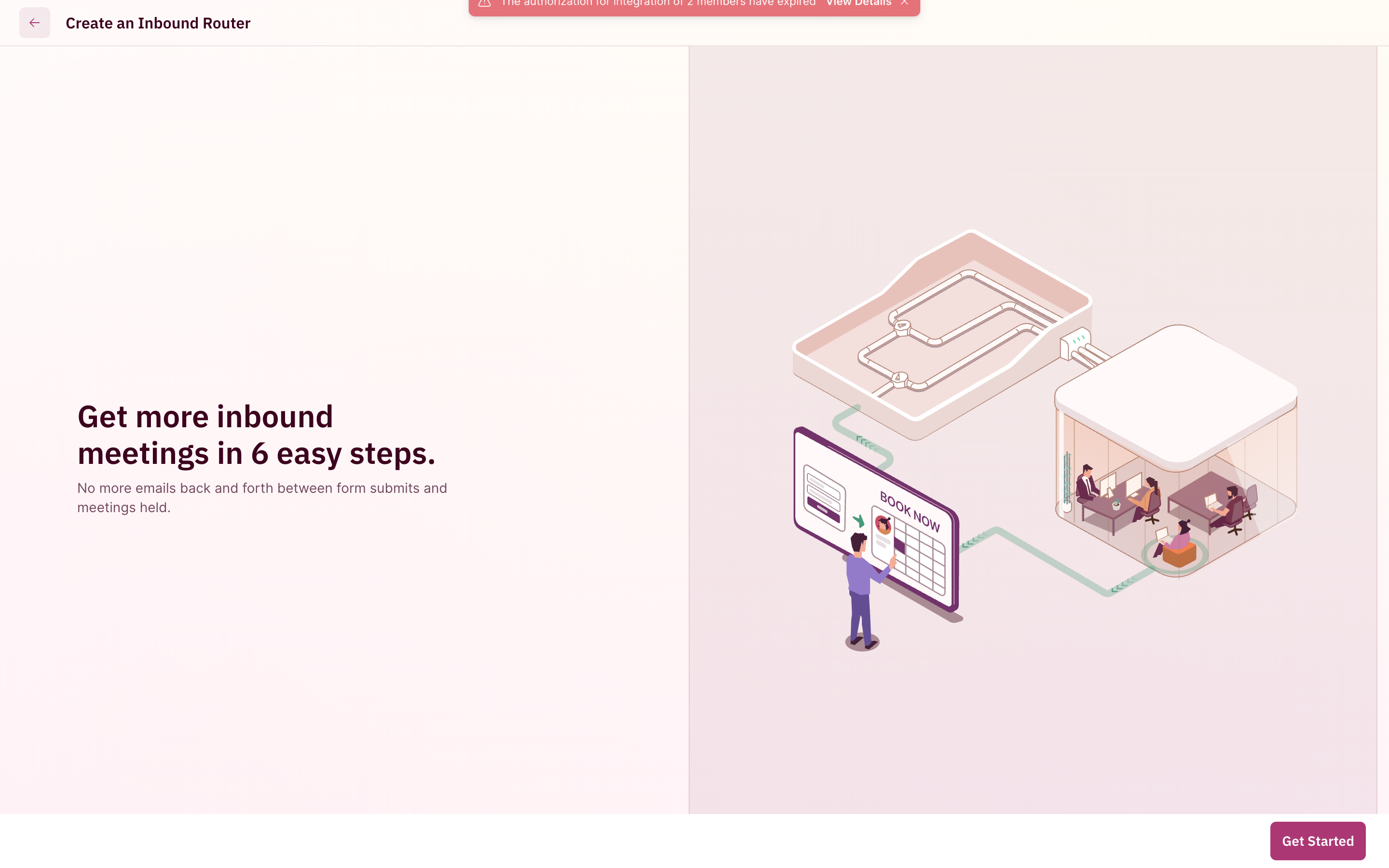
Create an Inbound Router setup flow

This is the highest-converting play because it combines qualification + routing + scheduling in a single interaction. The prospect never has to think about who they should be talking to. The system figures it out.

PRO TIP
Use the same router for your event landing page. Pre-event registrants book a specific time slot at your booth before they even arrive. Your team starts the event with meetings already on the calendar.

Play 2

QR Codes for Floor Reps

Best for: Hallway conversations, after-parties, networking sessions

Every rep on your team has a personal meeting link in RevenueHero. QR codes can be generated for each link using the built in chrome functionality to make it easy to access. Here’s how floor reps use it:

  1. Rep has a conversation with a prospect on the event floor
  2. Rep pulls up their QR code on their phone
  3. Prospect scans it
  4. Prospect sees the rep's availability for the event dates only (the event meeting type restricts it)
  5. Prospect books a meeting right there

The meeting is logged in the CRM with the rep as the owner. Slack notifications fire. Calendar invites go out. All before the prospect has walked 10 feet.

What you can customize on the booking page:

  • Your logo and brand colors (complete white-labeling)
  • A welcome video or image
  • Meeting duration options (15 min quick chat vs. 30 min deep dive)
  • Custom redirect URL after booking (your post-event landing page)
PRO TIP
Print QR codes on the back of business cards. When a rep runs out of booth swag, the business card with a scannable QR code becomes the most valuable piece of collateral they're carrying.

Play 3

SDR-to-AE Relay on the Floor

Best for: Events where SDRs staff the booth and AEs close the deals

This is RevenueHero's Relay feature adapted for event floors:

  1. SDR qualifies a prospect at the booth
  2. SDR opens their relay link or their QR code that the prospect can scan
  3. RevenueHero looks up the account in the CRM
  4. If the account has an existing owner, the AE's calendar appears
  5. Prospect books directly on the AE's calendar
  6. The SDR gets full attribution credit for sourcing the meeting


Relay routing logs show every handoff: matched pod, booking status, and which rep gets attribution credit.

This solves the "who gets credit" problem that plagues event teams. SDRs are motivated to qualify aggressively because they get credit. AEs get pre-qualified meetings on their calendar.

PRO TIP
Set up a fallback rule for cases where the CRM doesn't have an account match. If the prospect is from a company not yet in your CRM, the relay falls back to round robin across available AEs. No lead falls through the cracks.

The Problem

Events aren't inbound. They need their own infrastructure.

Most scheduling tools treat events as an afterthought. "Just create a booking link and share it." That falls apart the moment you need any of these:

Date-restricted availability

Your booth is open Nov 4-6. Your scheduler should only show those three days. Not next Monday. Not two weeks from now.

Field team isolation

The two reps at your booth shouldn't receive website inbound demos during the event. They're working the floor, not their laptop.

Named account routing

When a prospect from an existing account walks up, their meeting should route to the account owner. Not whoever's closest to the iPad.

SDR-to-AE handoff on the floor

Your SDR qualifies a lead at the booth. The meeting should land on the AE's calendar, with full credit to the SDR who sourced it.

Reps forget to block calendar

You have 90 seconds of someone's attention at a booth. Every extra form field is a meeting you don't book. Native enrichment means your booth form can be two fields instead of six.

RevenueHero has a dedicated event scheduling engine built for exactly this. Here's how to set it up.

Set up your event pipeline in under 15 minutes

1. Create an Event Meeting Type

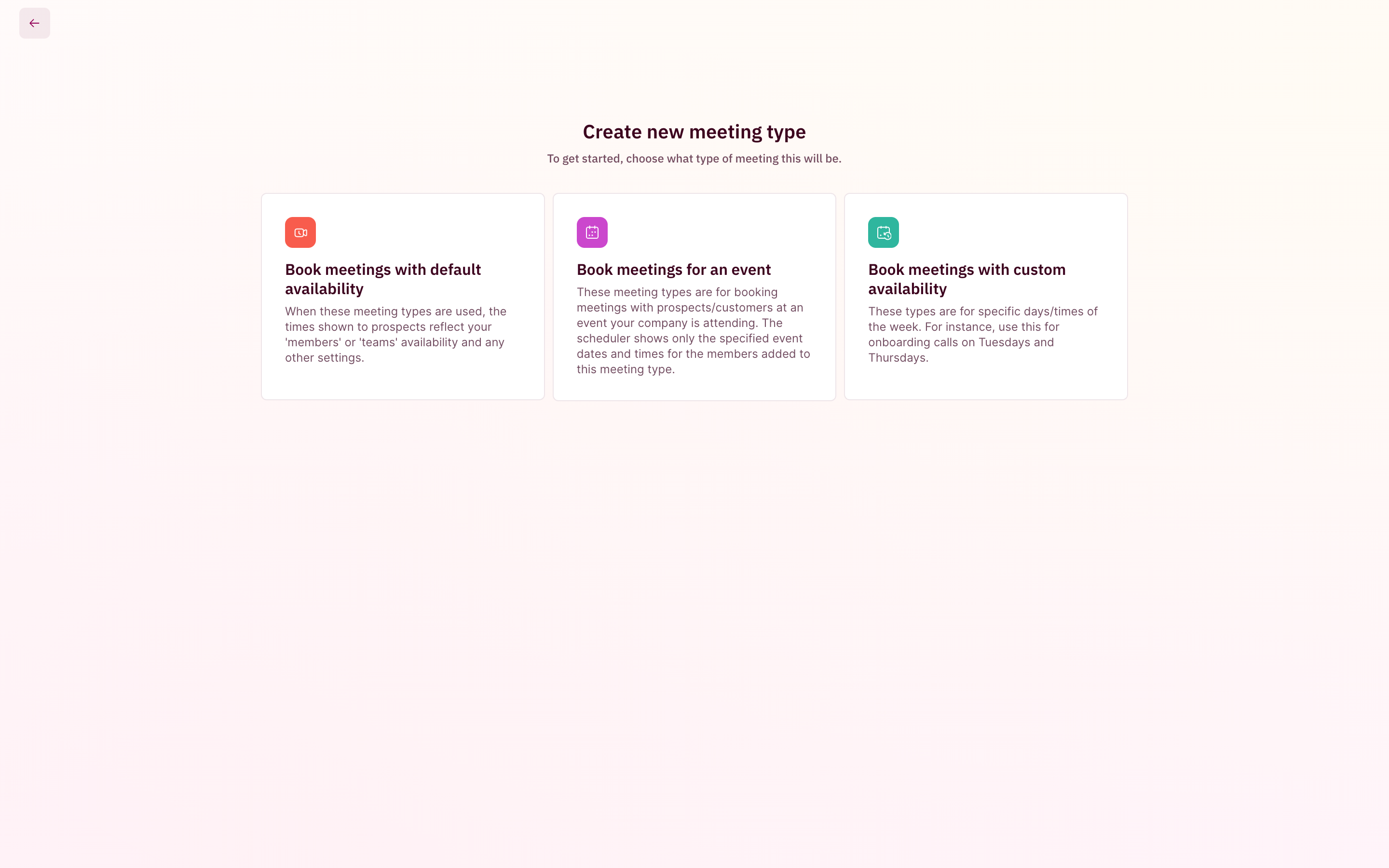
When you create a new meeting type in RevenueHero, you'll see three options. Choose "Book meetings for an event."

Create new meeting type with three options: default availability, event, and custom availability

This unlocks event-specific configuration that regular meeting types don't have:

  • Date-restricted scheduling — Prospects only see the exact dates of your event
  • Per-participant availability — Each booth rep sets their own hours within those dates
  • Meeting blocking — Block your field team from receiving non-event meetings during the event
2. Lock in your event dates and hours

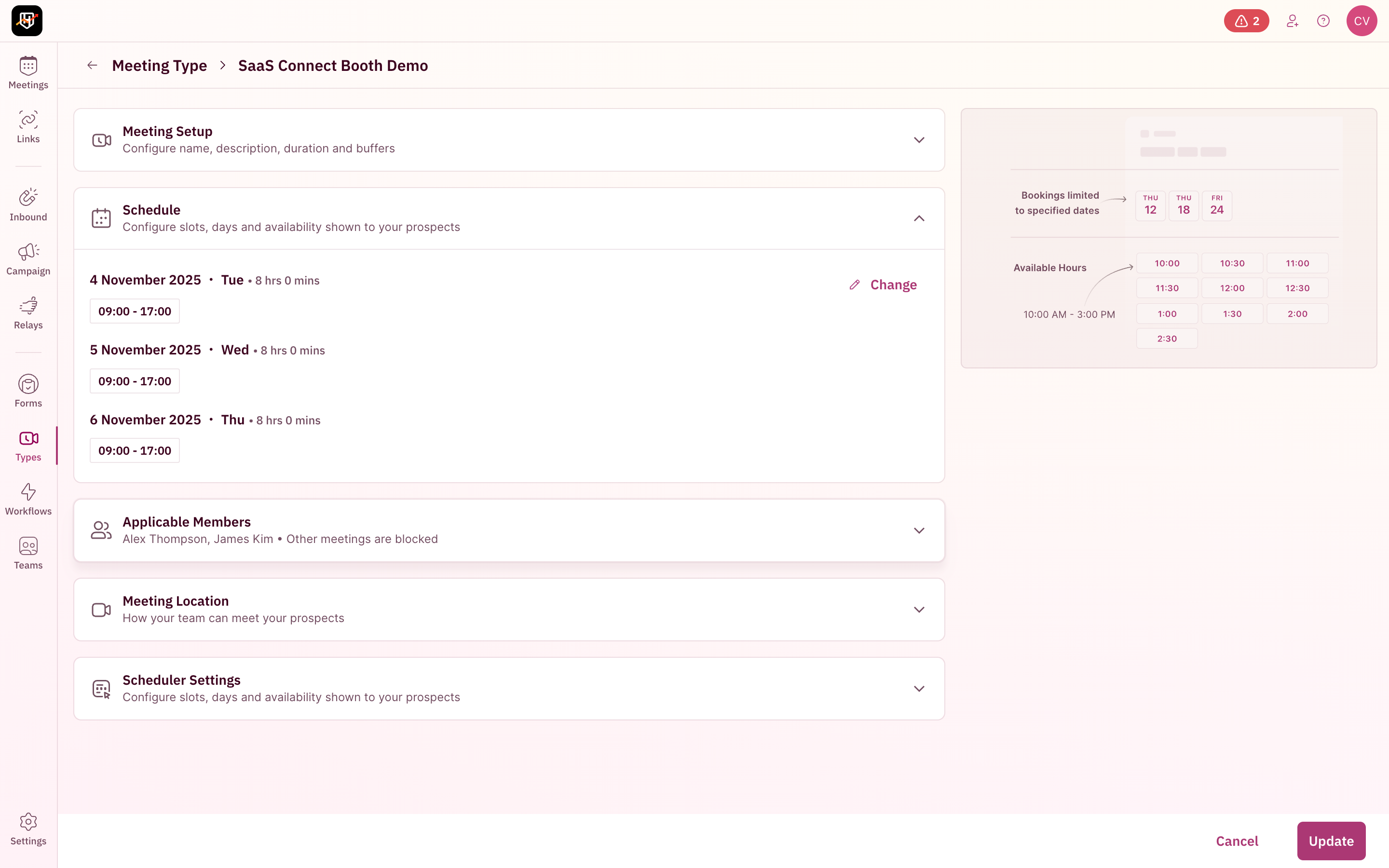
Open the Schedule section and set the specific dates your team will be at the event. For a 3-day conference, that might be Nov 4-6, 09:00-17:00 each day.

Schedule section showing three event days with configurable hours

The scheduler will only show availability within these windows. No prospect accidentally books a call for the following Monday. No awkward "sorry, we're not actually available then" emails.

PRO TIP
For events that span non-consecutive days (like a Tuesday session + a Thursday happy hour), you can set individual dates rather than a continuous range.


3. Assign your field team

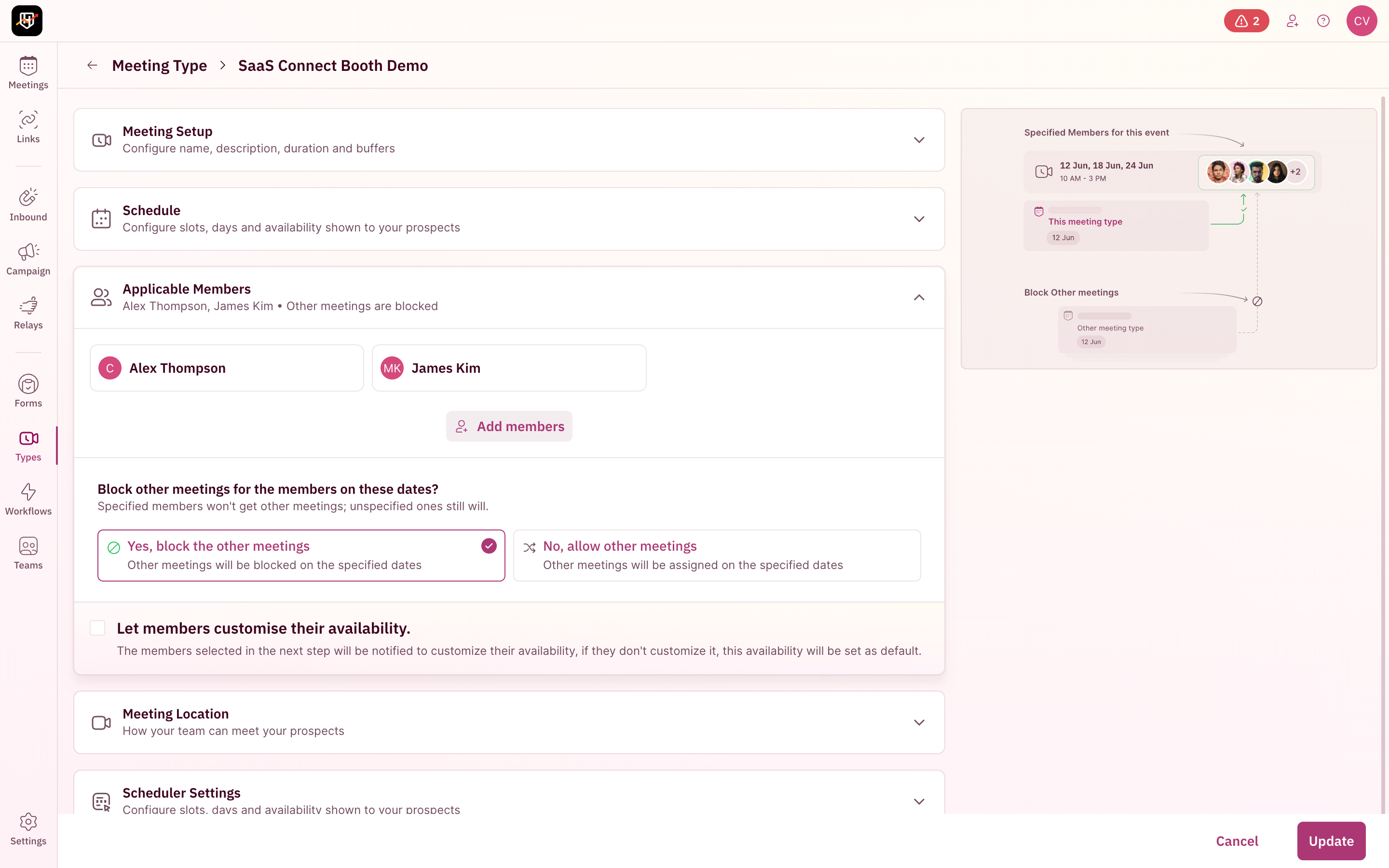
The Applicable Members section is where you select exactly who's working the booth.

Applicable Members section showing assigned reps and meeting blocking options

Two critical options:

  • "Yes, block the other meetings" — Selected reps won't receive any non-event meetings during those dates. Their inbound website bookings, campaign router meetings, and relay handoffs all pause. This is what you want for dedicated booth staff.
  • "No, allow other meetings" — Selected reps stay in the regular rotation AND handle event meetings. Use this when a rep is attending but still working their territory remotely.
  • "Let members customise their availability" — Each rep gets notified to set their own hours within the event dates. Useful when different reps are covering different shifts.
PRO TIP
Running SaaStr and Dreamforce in the same quarter? RevenueHero automatically detects scheduling conflicts when a rep is assigned to multiple simultaneous events. No double-bookings across events.

4. Configure the booth experience

In the Meeting Location section, set the meeting format:

  • Location name: "Booth #247, Moscone Center, San Francisco" — this shows in the calendar invite
  • Description: Include a venue map link or directions to your booth
  • Video conferencing: Turn this off for in-person booth meetings. Turn it on for pre-event virtual meetings.
  • Calendar invite text: Customize what the prospect sees. Include your booth number, what to expect, and a reschedule link.
PRO TIP
Set the buffer between meetings to 5-10 minutes. Your booth reps need breathing room between conversations. A 30-minute meeting with a 5-minute buffer means 7 quality meetings per rep per day instead of burning out at 10.


5. Set up your event router

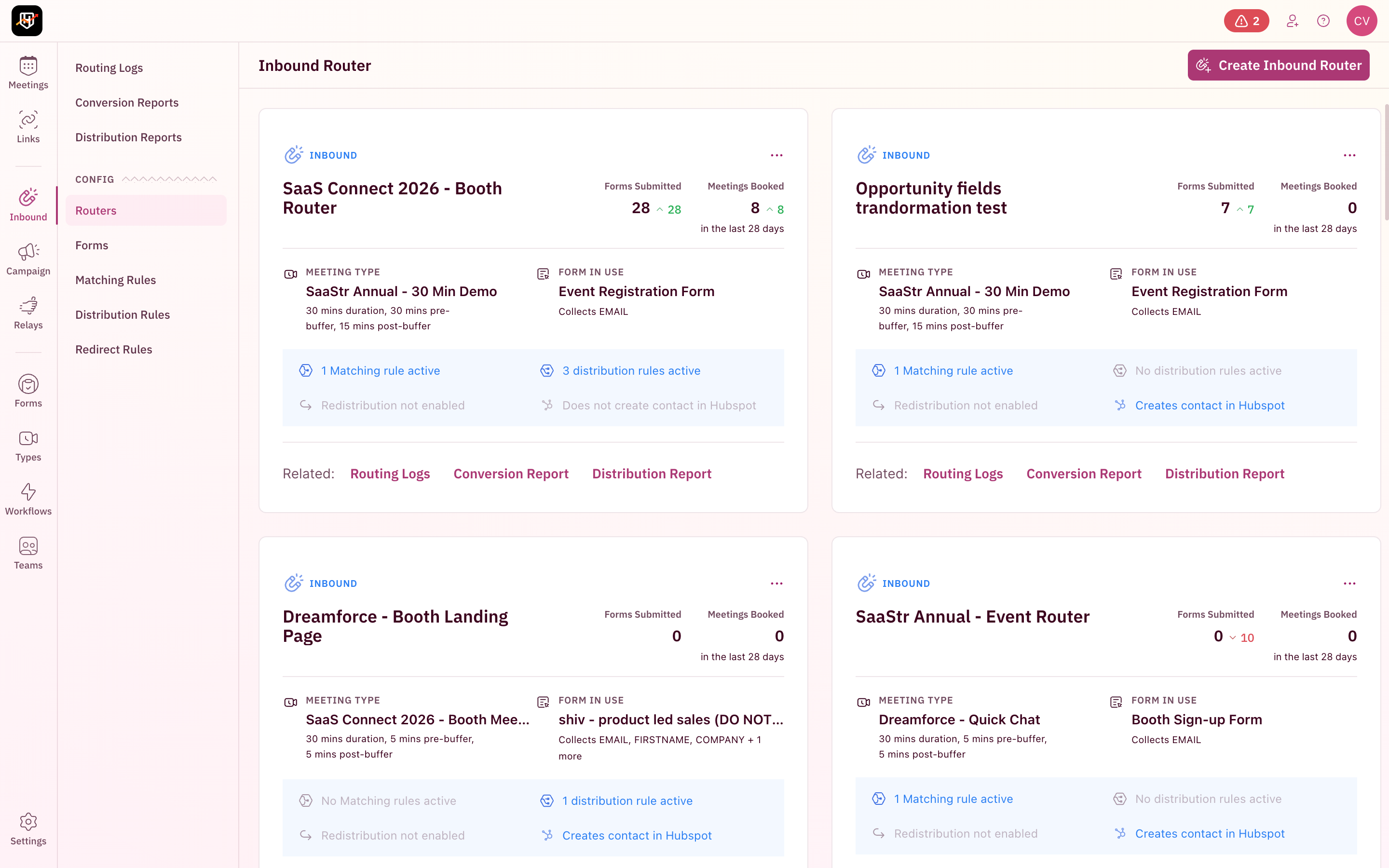
Connect your event meeting type to an Inbound Router. This is what powers the booking experience on your event landing page or booth iPad.

Inbound Router dashboard showing event-specific routers

The router handles everything between form submission and a booked meeting:

  • Form connection — Link to the form on your event landing page, or create a simple name + email form for the booth iPad
  • Matching rules — Automatically check if the prospect's account already exists in your CRM. If it does, route to the account owner.
  • Distribution rules — For net-new leads, route based on territory, company size, or round robin across your booth team
  • CRM sync — Every meeting is automatically logged. Contact created if new. Activity attached if existing.
PRO TIP
Enable native enrichment on your event router. When a prospect enters just their name and work email at the booth, RevenueHero enriches the record with company name, size, industry, and geography before routing. Fewer fields = more meetings booked.

At the Event

Three plays for the event floor

You've done the setup. Now your team is on the ground. Each play is suited to a different situation on the floor.

Play 1
The Booth Landing Page

Best for: High-traffic booths with an iPad or tablet

Set up a simple form on a tablet at your booth. Two fields: name and email. When a prospect fills it out, RevenueHero takes over:

  1. Enrichment fires instantly — Company name, size, and industry are pulled from Apollo, Clearbit, or ZoomInfo
  2. CRM lookup happens — If this is an existing account, their account owner's calendar appears
  3. Routing rules evaluate — Net-new leads are routed to the right rep based on territory or round robin
  4. Calendar loads in under 3 seconds — The prospect picks a slot while they're still standing at your booth
Create an Inbound Router setup flow

This is the highest-converting play because it combines qualification + routing + scheduling in a single interaction. The prospect never has to think about who they should be talking to. The system figures it out.

PRO TIP
Use the same router for your event landing page. Pre-event registrants book a specific time slot at your booth before they even arrive. Your team starts the event with meetings already on the calendar.

Play 2

QR Codes for Floor Reps

Best for: Hallway conversations, after-parties, networking sessions

Every rep on your team has a personal meeting link in RevenueHero. QR codes can be generated for each link using the built in chrome functionality to make it easy to access. Here’s how floor reps use it:

  1. Rep has a conversation with a prospect on the event floor
  2. Rep pulls up their QR code on their phone
  3. Prospect scans it
  4. Prospect sees the rep's availability for the event dates only (the event meeting type restricts it)
  5. Prospect books a meeting right there

The meeting is logged in the CRM with the rep as the owner. Slack notifications fire. Calendar invites go out. All before the prospect has walked 10 feet.

What you can customize on the booking page:

  • Your logo and brand colors (complete white-labeling)
  • A welcome video or image
  • Meeting duration options (15 min quick chat vs. 30 min deep dive)
  • Custom redirect URL after booking (your post-event landing page)
PRO TIP
Print QR codes on the back of business cards. When a rep runs out of booth swag, the business card with a scannable QR code becomes the most valuable piece of collateral they're carrying.

Play 3

SDR-to-AE Relay on the Floor

Best for: Events where SDRs staff the booth and AEs close the deals

This is RevenueHero's Relay feature adapted for event floors:

  1. SDR qualifies a prospect at the booth
  2. SDR opens their relay link or their QR code that the prospect can scan
  3. RevenueHero looks up the account in the CRM
  4. If the account has an existing owner, the AE's calendar appears
  5. Prospect books directly on the AE's calendar
  6. The SDR gets full attribution credit for sourcing the meeting


Relay routing logs show every handoff: matched pod, booking status, and which rep gets attribution credit.

This solves the "who gets credit" problem that plagues event teams. SDRs are motivated to qualify aggressively because they get credit. AEs get pre-qualified meetings on their calendar.

PRO TIP
Set up a fallback rule for cases where the CRM doesn't have an account match. If the prospect is from a company not yet in your CRM, the relay falls back to round robin across available AEs. No lead falls through the cracks.

After the Event

Your event ROI is only as good as your follow-up

Automated workflows for every scenario

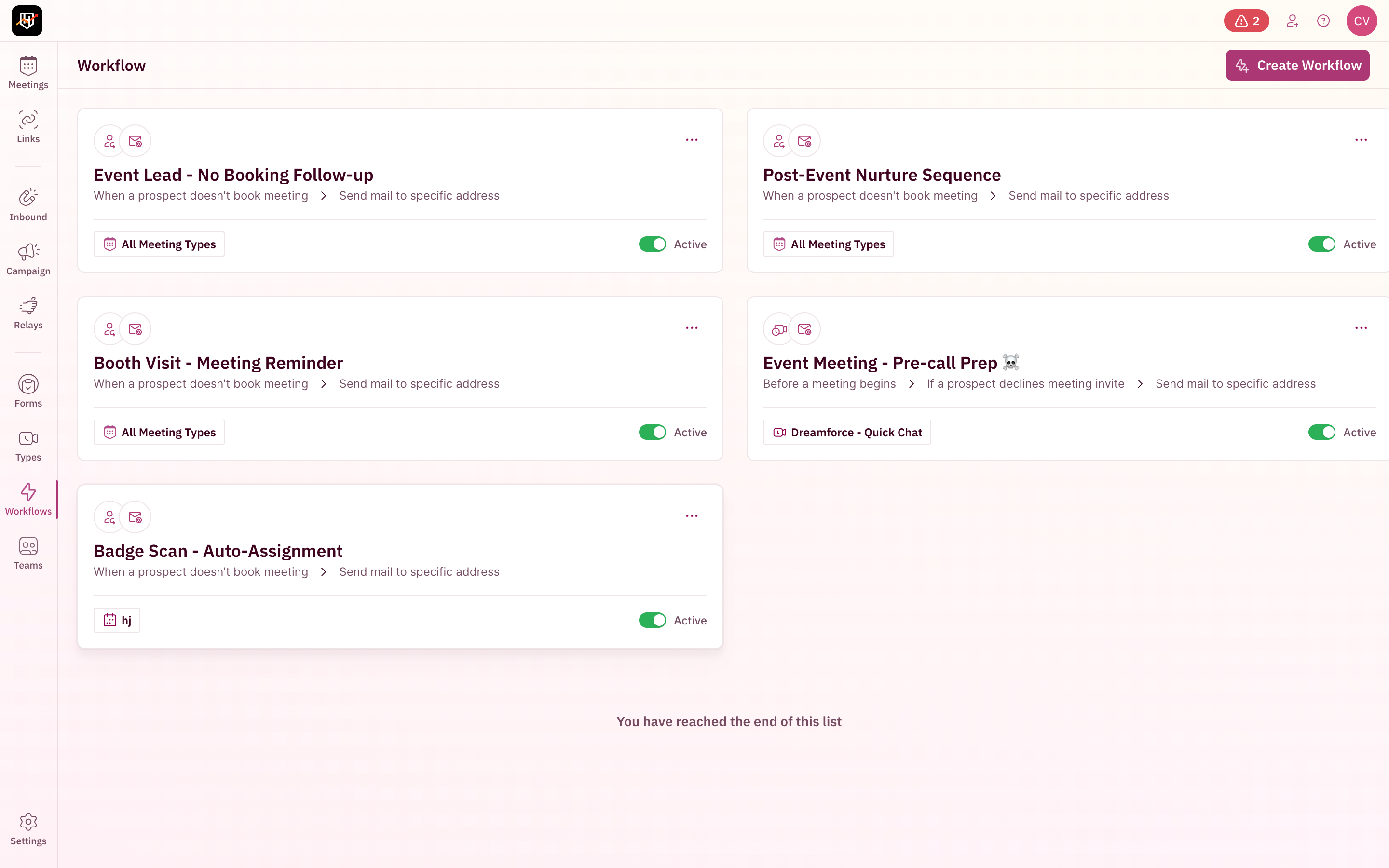
Set up workflows before the event so follow-up happens automatically while your team is flying home:

Event-specific workflows

TRIGGER: NO BOOKING
Abandoned booth form

Prospect filled out the form but didn't pick a time slot. RevenueHero meeting property is instantly updated in the CRM to allow downstream workflows to kick in. Lead gets redistributed via round robin.

TRIGGER: BEFORE MEETING
Pre-meeting reminder

30 minutes before the meeting, send a reminder with the booth location and what to expect. Include the reschedule link.

TRIGGER: 1 day before the meeting
Re-engagement sequence

If a prospects RSVP is a decline on the calendar invite, send out a reschedule link and relevant material.

TRIGGER: REAL-TIME
Slack notifications

Every booking, no-show, and cancellation posts to your #events Slack channel. Your field marketing lead sees pipeline being built from the airport.

CRM sync happens automatically

Every event interaction is logged without anyone lifting a finger:

  • New contacts created in HubSpot or Salesforce with enriched data
  • Meeting activities attached to the right contact and account records
  • Custom fields populated — meeting source (event name), meeting type (booth, relay, QR), rep attribution
  • Activity deduplication — RevenueHero prevents double-logging that plagues calendar sync tools. One meeting = one activity record. Clean reporting.
Post-event analytics

Use the Routing Logs to audit every interaction from the event. Filter by date range (your event dates), router (your event router), and status (booked vs. not booked). Every session shows the full decision trail: enrichment data, matching result, distribution rule fired, and scheduling outcome.

Advanced

Pro tips for teams running 5+ events per year

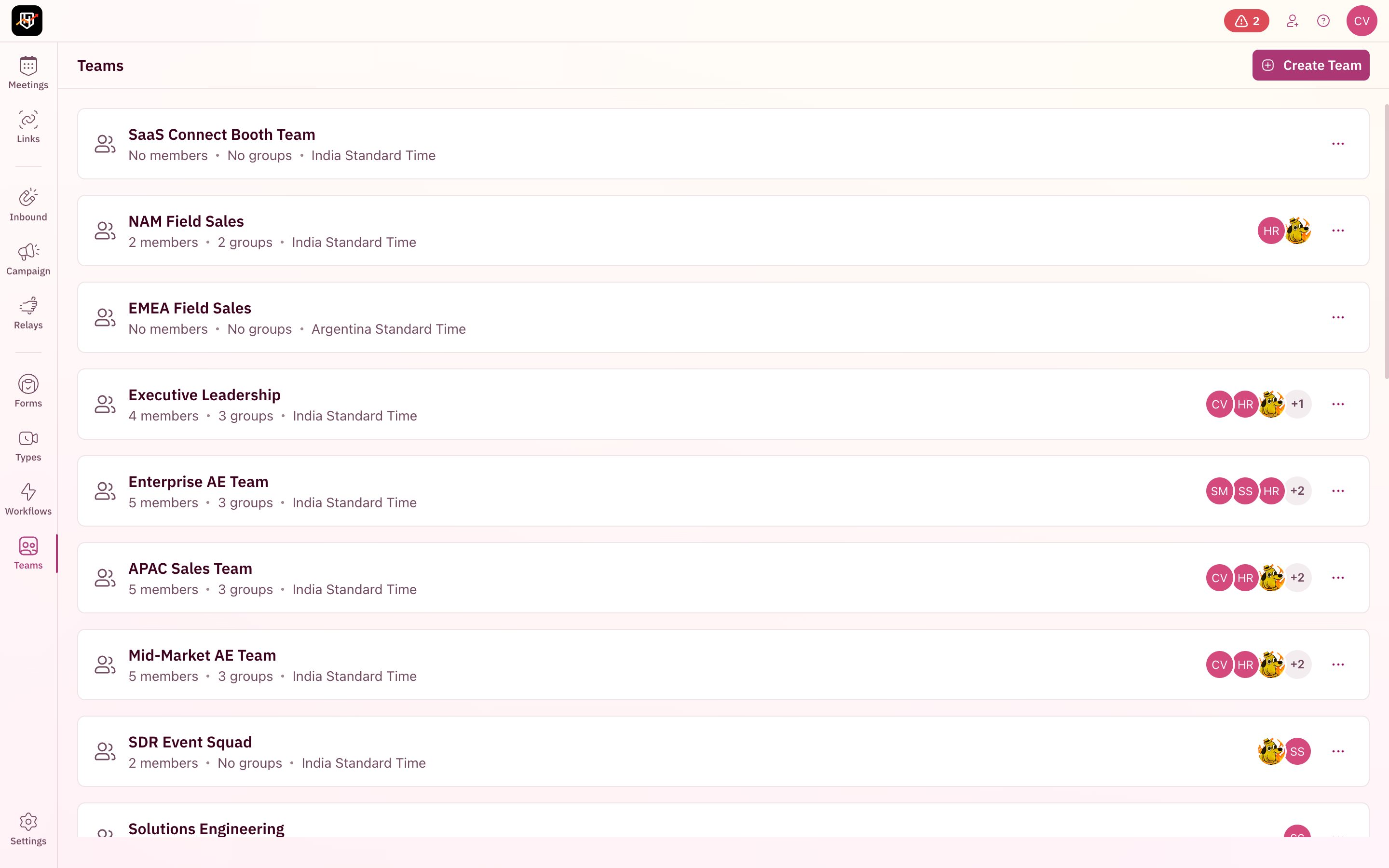
1. Create a dedicated event team
Teams page with event-specific teams

Create a team for each event. Add only the reps who are physically attending. Event leads go to event reps. Website leads go to your regular rotation. No cross-contamination.

2. Use Holidays to manage event travel

Your field team is flying in the day before and flying out the day after. They shouldn't get regular inbound meetings on travel days.

Use RevenueHero's Holidays feature to block those dates for your event team. Unlike other tools where each rep manually sets their own out-of-office, RevenueHero lets you block dates at the org level and assign them to specific users or teams. One admin action covers the entire booth crew.

3. Run multiple events simultaneously

Sending different teams to different events in the same week? Each event gets its own meeting type, its own router, and its own team. RevenueHero detects conflicts automatically. If a rep is somehow assigned to two events with overlapping dates, you'll know before the event, not during it.

4. Post-event lead processing

Have a stack of badge scans from the event that weren't booked on the floor? Two options:

  • Campaign Router — Create a magic link for your post-event email sequence. "Thanks for visiting our booth at SaaStr. Book a follow-up here." The link routes based on the same distribution rules as your booth router.
  • Pre-filled booking links — Append the prospect's email and name to your router URL. When they click, the form is bypassed entirely and they see the scheduler immediately. One-click booking from the post-event email.
5. Balanced Round Robin for fair event lead distribution

RevenueHero's Balanced Round Robin dynamically adjusts who receives the next meeting. If one rep booked 8 meetings at the booth and another booked 3, the system temporarily prioritizes the rep with fewer meetings. This prevents one charismatic booth rep from hoarding all the pipeline while others sit idle.

No other scheduling tool does this. It's unique to RevenueHero.

FAQ

Frequently asked questions

How do I restrict scheduling to only my event dates?
When you create a meeting type in RevenueHero, choose "Book meetings for an event". In the Schedule section, set the specific dates and hours your booth is open. The scheduler will only show availability within those windows. Prospects cannot book outside the event dates.
Can I stop my booth reps from getting inbound meetings during the event?
Yes. When you assign reps to an event meeting type, select "Yes, block the other meetings" in the Applicable Members section. This pauses all non-event bookings for those reps during the event dates, including website inbound, campaign router meetings, and relay handoffs. Their regular rotation resumes automatically when the event ends.
How does SDR-to-AE handoff work at an event booth?
RevenueHero's Relay feature handles this. The SDR qualifies a prospect at the booth, then opens their relay link. RevenueHero checks the CRM for an existing account owner. If one exists, the AE's calendar appears and the prospect books directly. The SDR gets full attribution credit for sourcing the meeting, and the AE gets a pre-qualified meeting on their calendar. If the account isn't in the CRM yet, a fallback rule routes the meeting via round robin across available AEs.
How do I route event leads to the right account owner?
Connect your event meeting type to an Inbound Router with CRM matching rules enabled. When a prospect submits the booth form, RevenueHero checks your CRM (HubSpot or Salesforce) to see if the account already exists. If it does, the meeting routes to the account owner. For net-new accounts, you can route by territory, company size, or round robin.
Can I use QR codes for booth scheduling?
Yes. Every rep’s meeting link, or your inbound meeting link can be turned into a QR code. When a prospect scans it, they see the rep's availability restricted to the event dates only. The meeting is logged in the CRM with the rep as the owner, and Slack notifications fire immediately. You can also print QR codes on business cards or booth signage.
What happens if a prospect fills out the booth form but doesn't book?
RevenueHero's abandonment workflows handle this automatically. When a prospect completes your booth form but doesn't select a time slot, a configurable timer triggers a follow-up email with a booking link. The lead gets redistributed via round robin so a different rep can follow up. No manual tracking needed.
How do I handle multiple events happening at the same time?
Each event gets its own meeting type, its own Inbound Router, and its own team in RevenueHero. If a rep is assigned to two events with overlapping dates, RevenueHero detects the scheduling conflict automatically and alerts you while you're setting up the event meeting type.
Does RevenueHero sync event meetings to my CRM?
Yes, automatically. Every event interaction is logged in HubSpot or Salesforce: new contacts are created with enriched data, meeting activities are attached to the right contact record, and custom fields capture the meeting source (event name), meeting type (booth, relay, or QR), and rep attribution. RevenueHero also deduplicates activities so one meeting equals one clean activity record.
How do I follow up with badge scans after the event?
Setup a follow up email sequence using your marketing automation product using an inbound or campaign link and include it in a follow up sequence. Use URL parameters to prefill the name and email or the contact/lead's CRM object ID. When the prospect clicks on the booking link they're shown the right rep's availabilities instantly and they're able to book a slot without the need to fill a form again.
How does native enrichment reduce form fields at the booth?
RevenueHero’s automated CRM sync ensures that every meeting booking attempt is logged. The contact gets created (if you don’t already have them in your CRM) and their properties are updated with the event meeting type and a meeting status. You get to automate email sequences specific to the event campaign. All bases covered.